
NEWJust launched: AI Omni Video Agent is live — chat to generate videos, no technical parameters requiredTry Agent
LogoAI Omni Video
  • Create
  • Omni Video Agent
  • AI Image
  • AI Video
  • Pricing
Logo
Now fully available for all public community usersNovember 2025

Flux 2 Pro Image Generator

Flux 2 Pro is the elevated higher-quality FLUX 2 variant for text-to-image and reference-guided image editing. It shines when your brief is visual-first, needs polished pre-export output, and uses multiple references to lock in color, materials, or composition.

Loading...

Prompt:

auto

1:1

4:3

3:4

16:9

9:16

3:2

2:3

Model:
Resolution

Loading...

Scene Examples 1
How to use Flux 2 Pro

Use Flux 2 Pro here for higher-quality image generation and editing

Begin with a clear visual brief, add references to lock in palette or product identity, then refine the frame until the output is presentation-ready.

01

Describe the image like a creative direction brief

Name the subject, materials, lighting, lens style, and desired overall presentation tone for the model to follow.

02

Use references for product, palette, or styling control

Upload up to 8 images to define color, materials, silhouette, or styling for a single output.

03

Refine for finish before moving to final export

First tighten prompt around composition and material quality, then run a higher-resolution pass once the core frame is finalized.

Core strengths of Flux 2 Pro

What stands out about Flux 2 Pro when finish matters most

Flux 2 Pro is the elevated FLUX variant on this page, ideal when you need results closer to a polished final direction rather than a rough draft.

Higher polish for luxury product and still-life work

Flux 2 Pro is ideal for frames needing clean, premium, presentation-ready product visuals.

Great for fragrance, packaging, and luxury tabletop scenes.
Prioritizes surface quality and finish over raw speed.
Pick it when results need to feel close to a final review-ready direction.

Stronger finish for editorial and campaign fashion

Flux 2 Pro shines when wardrobe, location, and commercial mood need more polish than a balanced standard variant.

Ideal for fashion campaigns and polished editorial concepts.
Delivers a higher finish level within the hosted workflow.
Opt for it when refinement matters more than fast iteration volume.

More premium treatment for interiors and hospitality

Also great for boutique interiors, hotel rooms, and design-led spaces needing premium presentation-ready assets.

Perfect for hospitality concepts and high-finish environment direction.
Material detail and lighting polish make it a top choice for Pro.
Ideal when the space itself is a key part of the premium offering.

Useful for polished direction boards and packaging reviews

Flux 2 Pro works well for packaging and direction boards needing cleaner results than exploratory concept sheets.

Supports premium packaging, launch boards, and polished brand reviews.
Delivers a finished look while remaining editable across prompt iterations.
Opt for it when the board itself needs to feel presentation-ready.
Best use cases

Where Flux 2 Pro works best

Flux 2 Pro excels when output needs polished, controlled results that feel campaign-ready before leaving the generator.

Premium product still lifes

Ideal for fragrance, skincare, packaging, and tabletop visuals where surface quality, palette control, and composition are critical.

Fashion and campaign key art

Great for editorial-style campaign frames, look-development imagery, and concept art needing a polished finish.

Reference-led brand visuals

Use multiple references to preserve product identity, material direction, or brand palette during generation or editing.

Higher-resolution creative review assets

Use Flux 2 Pro once your core concept is finalized, for a streamlined path to high-quality review images or campaign drafts.

Prompt patterns and examples

How to write better Flux 2 Pro prompts with real examples

These examples highlight the polished visual work Flux 2 Pro excels at: product still lifes, fashion frames, premium interiors, and reference-guided packaging direction.

Premium product visual

Leading prompt Alignment Benchmark Standards

Ideal for polished still lifes where materials, reflections, and palette control need to feel premium.
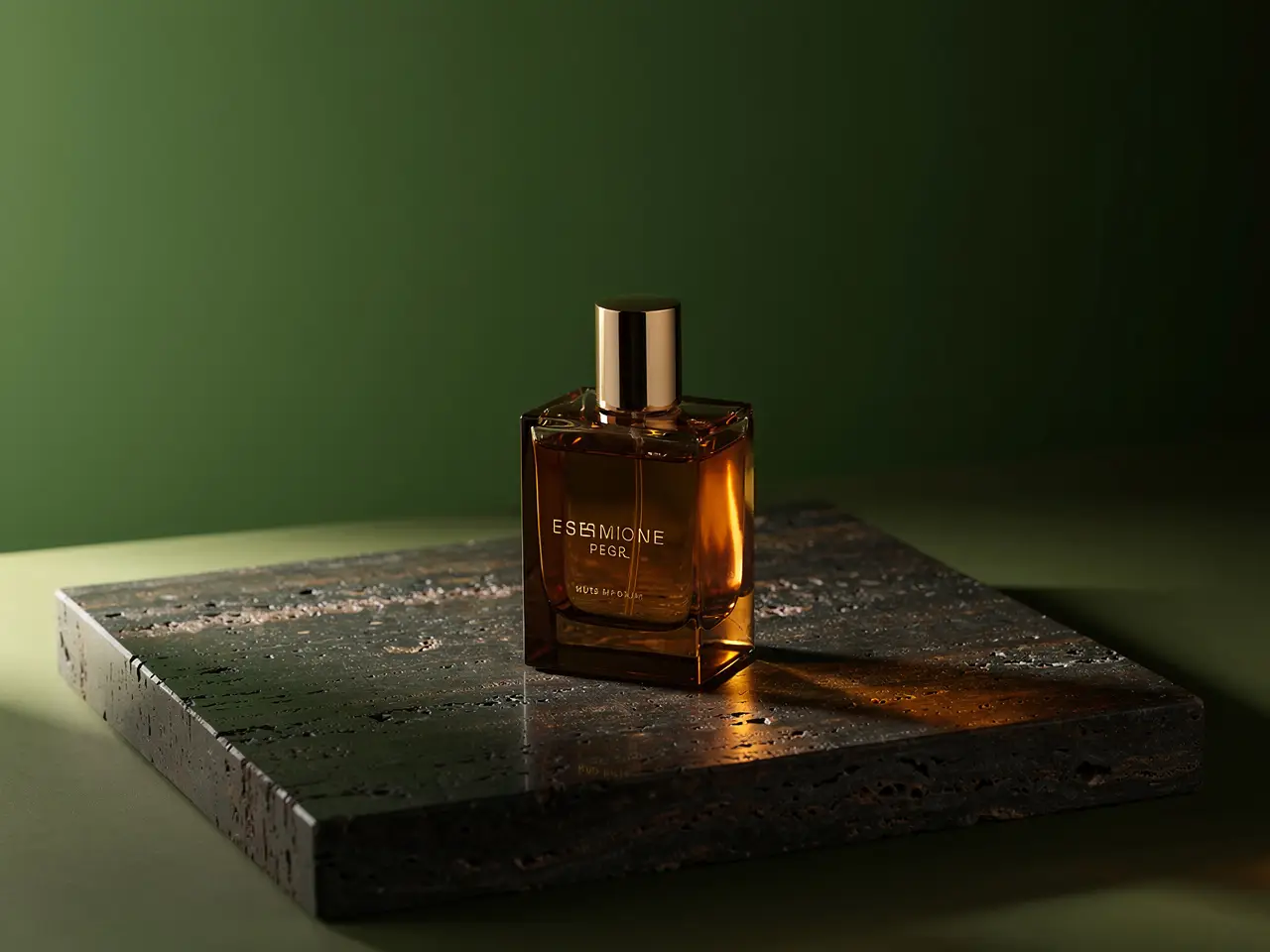
A luxury fragrance still life with precise reflections, premium materials, and a calm editorial palette.

Luxury fragrance still life

Proven industry-standard Prompt best-practice generation workflow guide

[product] + [surface and materials] + [light direction] + [color palette] + [campaign mood]

Dive into Complete prompt Documentation and Technical SpecificationsShow Full Breakdown

Detailed prompt Breakdown and Overview

Create a premium fragrance campaign still life. Show one amber glass bottle on dark travertine with soft side light, controlled reflections, deep moss and bronze accents, and a restrained editorial luxury mood. The image should feel ready for a beauty campaign mood board, with clean negative space and no extra props beyond a few warm reflective highlights.

Core Components That Power This Prompt’s High-quality Outputs

Flux 2 Pro performs better when the prompt specifies surfaces, light direction, and palette clearly, rather than using generic luxury terms.

Target Final Generated Outcome

A polished product still life for campaign concepting, launch decks, or brand direction.

Expert Insider Tips for Creative Industry Professionals

  • List surfaces and lighting first, then add atmospheric details.
  • Keep prop lists short to keep the product as the main focus.
Fashion concept

Leading prompt Alignment Benchmark Standards

Perfect for fashion frames needing controlled styling, camera distance, and a polished campaign feel.

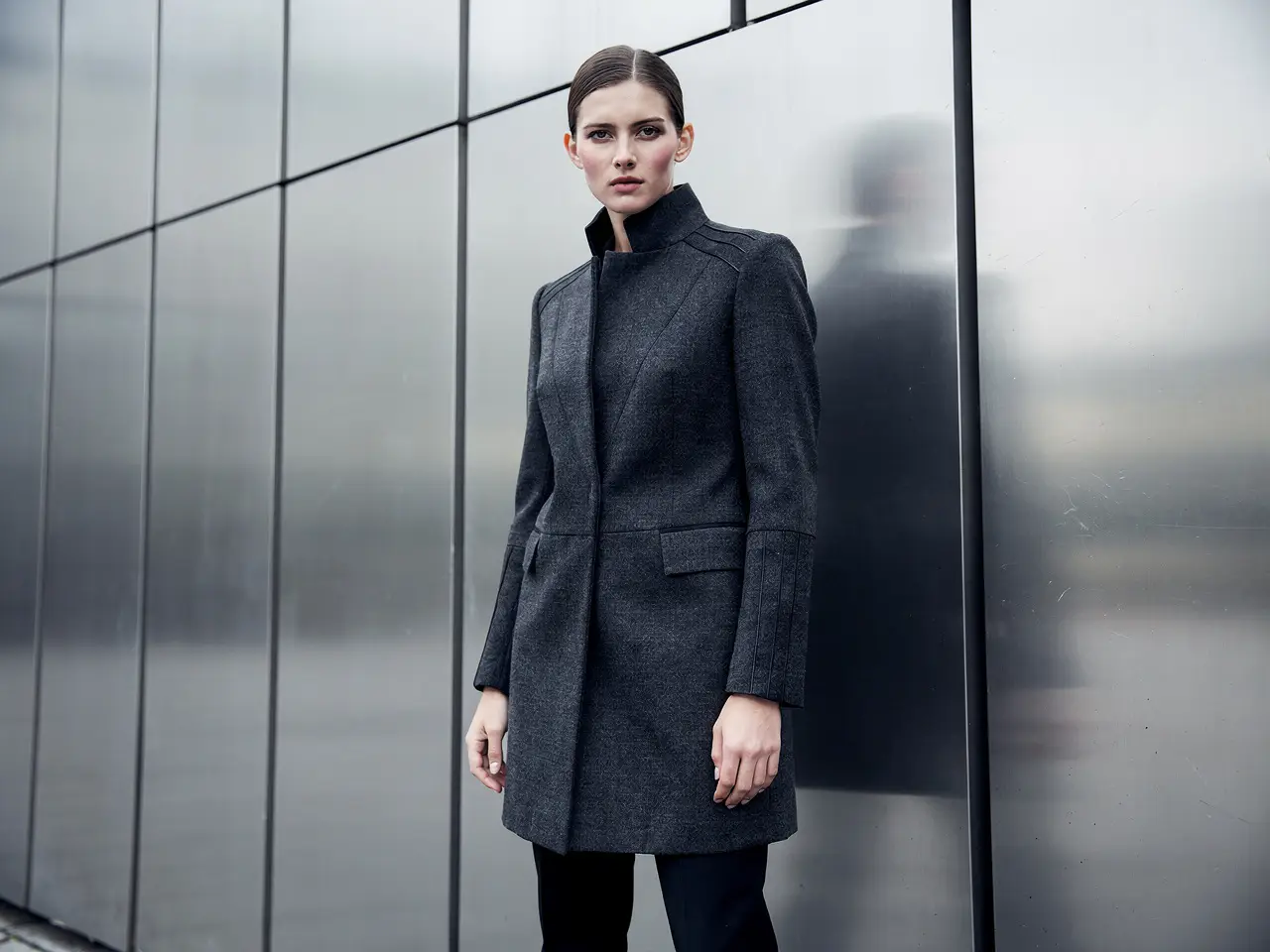
An editorial fashion campaign frame with controlled styling, refined color, and premium lighting.

Editorial fashion campaign frame

Proven industry-standard Prompt best-practice generation workflow guide

[subject] + [wardrobe] + [camera framing] + [location] + [editorial mood]

Dive into Complete prompt Documentation and Technical SpecificationsShow Full Breakdown

Detailed prompt Breakdown and Overview

Create an editorial fashion campaign frame of a model in structured charcoal outerwear standing beside brushed metal architecture. Use a medium-full camera distance, overcast daylight, clean shadow transitions, and a premium magazine mood. Keep the styling minimal, the posture calm, and the image polished enough to feel like a brand campaign direction rather than a casual street photo.

Core Components That Power This Prompt’s High-quality Outputs

This prompt balances subject, wardrobe, camera framing, and environment, helping Flux 2 Pro maintain composition and deliver polished results.

Target Final Generated Outcome

A finished-looking fashion concept image for campaign development or look direction.

Expert Insider Tips for Creative Industry Professionals

  • Specify camera framing directly to avoid unintended crops.
  • Stick to one clear mood reference instead of mixing conflicting fashion genres.
Interior concept

Leading prompt Alignment Benchmark Standards

Ideal for refined interior frames where materials, palette, and atmosphere need to read clearly.

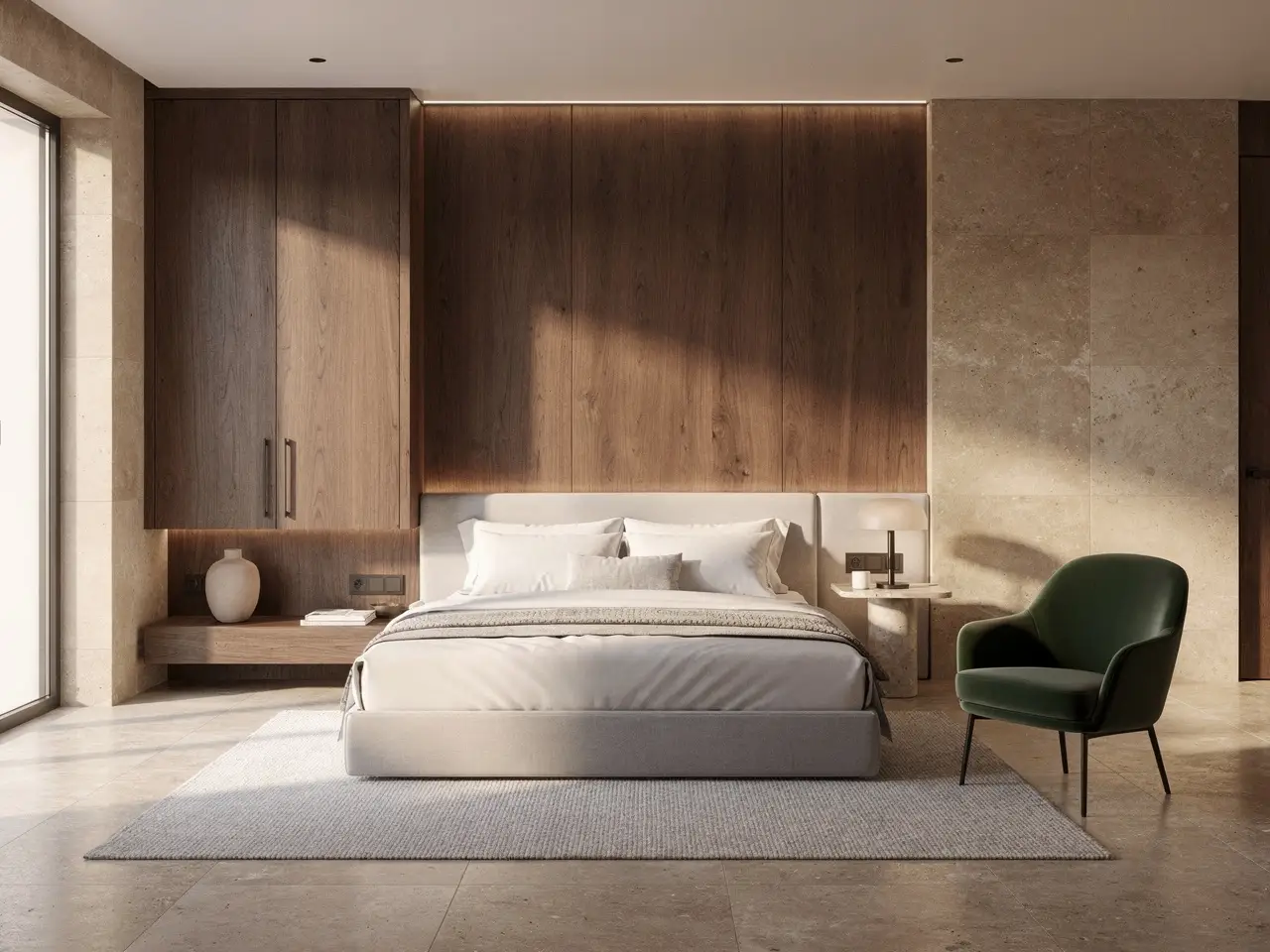
A boutique hotel room concept with warm materials, measured lighting, and a polished hospitality mood.

Boutique hotel room concept

Proven industry-standard Prompt best-practice generation workflow guide

[room type] + [material palette] + [lighting] + [camera angle] + [hospitality style]

Dive into Complete prompt Documentation and Technical SpecificationsShow Full Breakdown

Detailed prompt Breakdown and Overview

Create a boutique hotel room concept with walnut millwork, warm limestone, off-white bedding, and a deep olive accent chair. Use a wide but controlled camera angle from the foot of the bed, soft late-afternoon light, and a quiet premium hospitality mood. The room should feel polished and realistic, like an interior concept prepared for a design presentation.

Core Components That Power This Prompt’s High-quality Outputs

Flux 2 Pro works better when the prompt specifies materials, palette, and camera angle in a calm, focused request.

Target Final Generated Outcome

A polished interior concept for hospitality reviews, brand decks, or architectural mood boards.

Expert Insider Tips for Creative Industry Professionals

  • Name key materials to prevent generic luxury interior results.
  • Keep camera notes simple and targeted.
Reference-based edit

Leading prompt Alignment Benchmark Standards

Perfect for packaging updates where product identity stays consistent while label designs are modified.

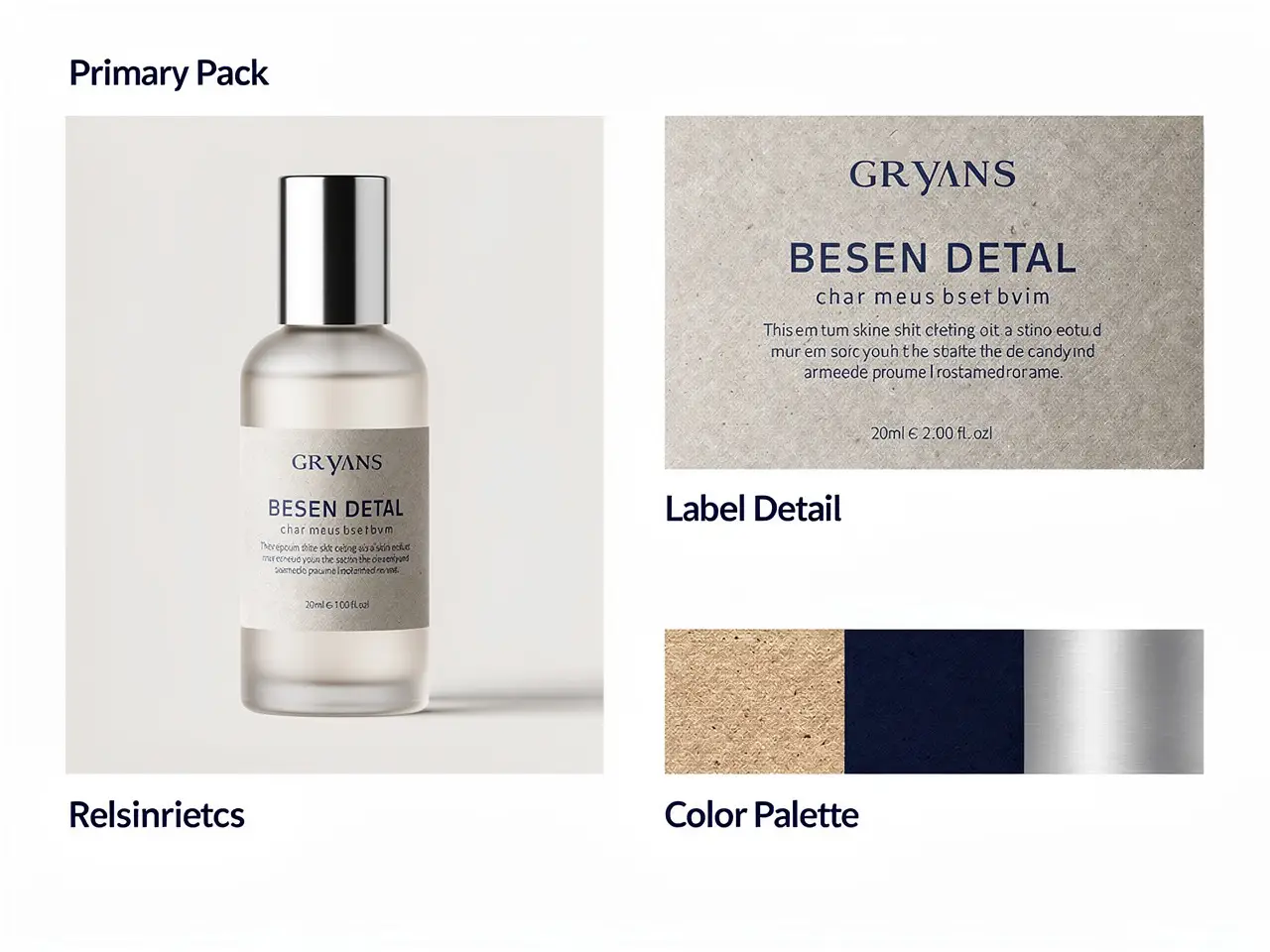
A packaging update board showing a stable product silhouette with a cleaner label direction and controlled palette.

Reference-led packaging update

Proven industry-standard Prompt best-practice generation workflow guide

[what stays] + [what changes] + [label direction] + [palette] + [presentation board]

Dive into Complete prompt Documentation and Technical SpecificationsShow Full Breakdown

Detailed prompt Breakdown and Overview

Keep the bottle silhouette and cap proportion from the reference image. Update the label system to matte stone, deep navy type, and a cleaner centered hierarchy. Present the result as a premium packaging review board with one hero bottle, one label close-up, and a small palette strip showing stone, navy, and brushed silver. The image should look like an internal brand review asset.

Core Components That Power This Prompt’s High-quality Outputs

This prompt clearly tells Flux 2 Pro what stays fixed and what changes, ensuring brand-consistent edits.

Target Final Generated Outcome

A cleaner packaging direction board for design review and launch planning.

Expert Insider Tips for Creative Industry Professionals

  • Note fixed elements first, then outline new changes.
  • Assign a clear role to each reference instead of uploading unlabeled assets.
When to choose Flux 2 Pro

Choose Flux 2 Pro when finish matters more than raw speed

Flux 2 Pro is ideal when images need polished pre-export results, especially for product, fashion, and brand visuals where composition and material quality are critical.

Choose Flux 2 Pro when the image should already feel presentation-ready

Use it when your brief is visual-first, and output needs stronger polish, cleaner material rendering, and confidence in the final frame before export.

Use another model when you need a different tradeoff

Opt for Flux 2 for a balanced family variant, Flux 2 Klein for faster iteration, Seedream 4.5 for a different high-resolution visual bias, and Z-Image if open deployment is a priority.

Community proof

Video walkthroughs and outside reviews for Flux 2 Pro

These videos share creator perspectives on Flux 2 Pro and its comparisons to other high-fidelity image models, serving as supporting context after reviewing the examples above.

Curated AI Video Generation Showcase

Open-source ecosystem

Related open-source projects for Flux 2 Pro

Flux 2 Pro is part of the public FLUX.2 family ecosystem, so the best open-source reference is the family-level repository and release materials, not a separate Pro-only page.

GitHub Publicly Available Source Code Repository for the Official Open-Source Project 01

black-forest-labs / flux2

Official family repository

The official FLUX.2 repository from Black Forest Labs. It’s the top family-level reference for understanding how Flux 2 Pro fits into the broader FLUX.2 release and tooling ecosystem.

1,105 Total number of GitHub stars accrued across the project repository
Apache-2.0
Visit the Open-Source Project Hub
FAQs

FAQ

About AI Omni Video and our platform

What is Flux 2 Pro?

Flux 2 Pro is the elevated higher-quality FLUX 2 variant available here. It’s built for text-to-image and reference-guided editing when final polish before export is critical.

What is Flux 2 Pro best for?

Flux 2 Pro excels at premium product visuals, campaign key art, fashion frames, still-life concepts, and any image work where finish and composition matter more than raw speed.

Does Flux 2 Pro support image input here?

Yes. Here, Flux 2 Pro supports up to 8 reference images, making it ideal for product updates, look-development boards, and edits where palette, materials, or styling must align closely to your brief.

Which resolutions and aspect ratios does Flux 2 Pro support here?

Flux 2 Pro supports 1K and 2K on this page. Available aspect ratios include 1:1, 4:3, 3:4, 16:9, 9:16, 3:2, 2:3, plus auto.

How do I write better Flux 2 Pro prompts?

Frame your prompt as a clear visual brief: name the subject, materials, camera distance, palette, and define what each reference image controls. Flux 2 Pro performs best with concrete, focused requests rather than overloaded generic style terms.

When should I use Flux 2 Pro instead of Flux 2 or Flux 2 Klein?

Pick Flux 2 Pro when you need a more polished pre-export image. Use Flux 2 for a balanced family variant, and Flux 2 Klein for faster iteration over final polish.

Is Flux 2 Pro good for premium product and fashion visuals?

Absolutely. Flux 2 Pro is ideal for premium product and fashion work, delivering cleaner material rendering, tighter composition, and a more polished campaign-ready feel.

Can I use Flux 2 Pro images commercially?

For commercial production, treat Flux 2 Pro output the same as any hosted model’s results. Commercial suitability depends on your use case, internal review process, and applicable platform terms.

Still have questions? We're here to help

Join Discord
Related models

Compare Flux 2 Pro with other image models on this site

If Flux 2 Pro isn’t the right fit, compare these related models for faster iteration, lighter family variants, different visual biases, or open deployment tradeoffs.

Flux 2 Image Generator

Use Flux 2 for a more balanced same-family variant, rather than prioritizing final polish.

Explore Curated Associated AI Models

Flux 2 Klein Image Generator

Compare Flux 2 Klein for faster, lighter iteration over final polish.

Explore Curated Associated AI Models

Seedream 4.5 Image Generator

Test Seedream 4.5 for a different high-resolution visual path for polished campaign and poster work.

Explore Curated Associated AI Models

Nano Banana Pro Image Generator

Compare Nano Banana Pro for another high-fidelity hosted workflow with stronger text-aware structure.

Explore Curated Associated AI Models

Try Flux 2 Pro here

Open the generator, start with a clear visual brief, and use references to keep output aligned to product, palette, or styling goals.

Resources
  • Blog
  • Create
  • Scenes
  • Portfolio
  • Prompts
  • Image to Prompt
  • Batch Image to Prompt
Company & Legal
  • About
  • Contact
  • Privacy Policy
  • Terms of Service
  • Refund Policy
Image Models
  • Z-Image
  • GPT-4o
  • Flux 2
  • Flux 2 Pro
  • Flux 2 Klein
  • Qwen Image 2
  • Seedream 4.0
  • Seedream 4.5
  • Seedream 5.0
  • Grok Imagine
  • Gemini 3 Pro Image
  • Nano Banana Flash
  • Nano Banana 2
Video Models
  • Google Veo 3.1
  • Google Veo 3.1 Lite
  • Google Veo 3.1 Pro
  • Seedance 1.5 Pro
  • Seedance Fast
  • Seedance Quality
  • Seedance 2.0
  • Hailuo 02
  • Kling v2.6
  • Kling v2.5 Turbo
  • Kling v2.1
  • Kling v2.1 Master
  • Kling O1
  • Kling v3.0
  • Kling v3.0 Pro
LogoAI Omni Video

AI Omni Video | Fast, professional AI video creation

TwitterX (Twitter)DiscordEmail

AI Omni Video is an independent AI video generation platform. All third-party trademarks belong to their respective owners.

© 2026 AI Omni Video All Rights Reserved. DREAMEGA INFORMATION TECHNOLOGY LLC

[email protected]