

NEWJust launched: AI Omni Video Agent is live — chat to generate videos, no technical parameters requiredTry Agent
LogoAI Omni Video
  • Create
  • Omni Video Agent
  • AI Image
  • AI Video
  • Pricing
Logo
Now fully available for all public community usersFebruary 2026

Seedream 5.0 Image Generator

Seedream 5.0 is the newer Seedream route for image generation and reference-based editing, ideal for broader multi-image support, polished commercial high-resolution output in a hosted workflow.

Loading...

Prompt:

auto

1:1

5:2

16:9

9:16

4:3

3:4

Model:
Resolution

Loading...

Scene Examples 1
How to use Seedream 5.0

Use Seedream 5.0 for modern Seedream generation and multi-image editing

Start with a clear image brief, define what each reference contributes, and refine until the frame is ready for review at your target resolution.

01

Write a clear prompt that outlines your image goal

Name your subject, scene, desired finish, and the campaign or review context for the image.

02

Assign roles to your reference images

Use up to 14 images when multiple products, palettes, or style cues need to shape the final output.

03

Refine to a review-ready frame

Adjust composition, material cues, and emphasis until the image works as a campaign or product review asset.

Core strengths of Seedream 5.0

What makes Seedream 5.0 stand out as the newer Seedream route

Seedream 5.0 is ideal when multiple references shape a polished result, the image needs to feel campaign-ready, and you want the updated Seedream family behavior.

Broader multi-image support for structured boards

Seedream 5.0 works well for high-res boards or campaign frames shaped by multiple products, palettes, or styling cues.

Great for travel kits, product families, and larger brand system boards.
The workflow stays practical even with multiple aligned inputs.
Fits jobs where standard Seedream routes fall short.

A newer route for polished campaign imagery

Seedream 5.0 excels when you need images closer to campaign review assets than early drafts.

Perfect for product launches, beverage campaigns, and commercial concept reviews.
Performs best when your prompt names the campaign context directly.
The final frame feels prepped for review at larger sizes.

Premium beauty and close-up detail work

Seedream 5.0 handles tight close-up commercial beauty direction, aligning subject, product, palette, and light.

Ideal for skincare, cosmetics, and premium beauty campaign concepts.
Works best when your prompt explains both product role and final finish.
Stronger with coherent, focused beauty briefs rather than overloaded requests.

Retail and environment presentation work

Seedream 5.0 works for retail windows, brand environments, and other presentation-led concepts ready for deck review.

Expands use cases beyond product-only work.
Performs well when materials, display elements, and brand mood are clearly defined.
Creates presentation-ready images without overcomplicating composition.
Best use cases

Where Seedream 5.0 works best

Seedream 5.0 shines when your workflow needs updated Seedream behavior, high-res output, and multiple references shaping a single image.

Campaign boards and key visuals

Use it for campaign boards, key visuals, and commercial drafts needing polished frames with room for iteration.

Multi-item product and brand systems

Ideal for coordinating multiple products or design cues into a single cohesive visual direction.

Stylized commercial scenes

Use Seedream 5.0 for stylized commercial imagery that feels polished, directional, and presentation-ready.

High-resolution review images

Use it when client-facing or review-ready assets matter, and the image needs to stay editable across multiple rounds.

Prompt patterns and examples

Craft better prompts with real Seedream 5.0 examples

These examples focus on polished multi-subject and commercial requests. Prompts work best when they explain the frame content and how the image fits a review or campaign context.

Product board

Leading prompt Alignment Benchmark Standards

Best for coordinated multi-item product boards ready for brand review, not collage-style layouts.

A travel kit concept board with coordinated items, polished materials, and a clean review layout.

Travel kit concept board

Proven industry-standard Prompt best-practice generation workflow guide

[product family] + [layout] + [palette] + [materials] + [review-board mood]

Dive into Complete prompt Documentation and Technical SpecificationsShow Full Breakdown

Detailed prompt Breakdown and Overview

Create a premium travel kit concept board with a carry-on, pouch, passport sleeve, and neck pillow. Use a warm taupe, charcoal, and brushed silver palette, clean top-down layout, and a polished review-board mood suitable for a premium travel brand direction deck.

Core Components That Power This Prompt’s High-quality Outputs

Seedream 5.0 responds well to multiple objects tied to a single palette and board composition.

Target Final Generated Outcome

A coordinated brand board for product family review and campaign planning.

Expert Insider Tips for Creative Industry Professionals

  • Name the full product family so the board feels coordinated.
  • Use one clean board layout instead of several disconnected scenes.
Campaign concept

Leading prompt Alignment Benchmark Standards

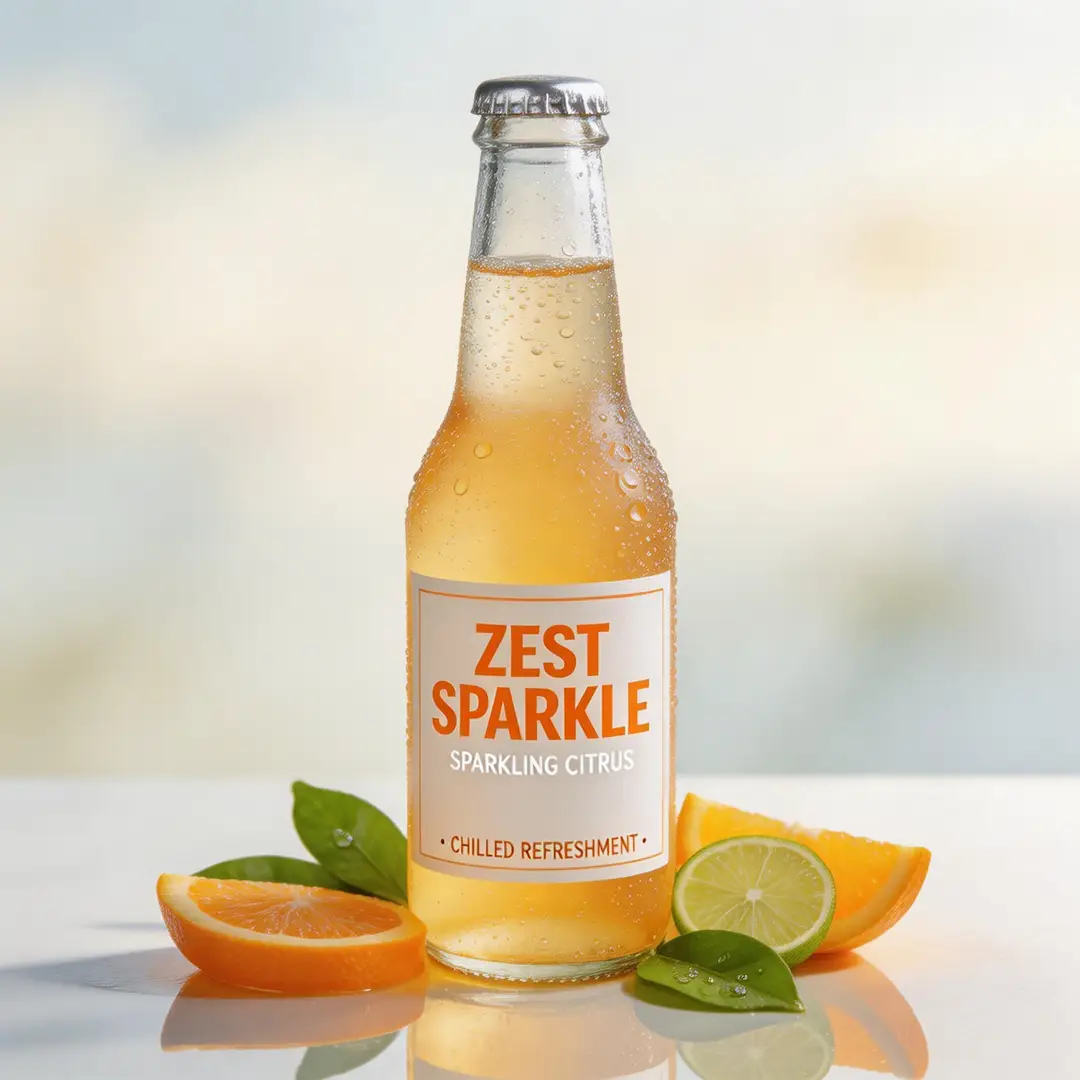
Best for commercial beverage visuals needing polish, energy, and high-res finish.

A high-detail beverage campaign frame with polished lighting and strong commercial energy.

High-detail beverage campaign frame

Proven industry-standard Prompt best-practice generation workflow guide

[product] + [hero setup] + [palette] + [light] + [campaign tone]

Dive into Complete prompt Documentation and Technical SpecificationsShow Full Breakdown

Detailed prompt Breakdown and Overview

Create a high-detail beverage campaign frame for a sparkling citrus drink. Show one chilled bottle with cold condensation, bright citrus accents, reflective highlights, and a clean premium summer campaign tone. The image should feel polished and review-ready at high resolution.

Core Components That Power This Prompt’s High-quality Outputs

This prompt gives Seedream 5.0 one product, one lighting story, and one commercial context to create a strong, review-ready frame.

Target Final Generated Outcome

A polished beverage campaign draft for brand review and launch planning.

Expert Insider Tips for Creative Industry Professionals

  • Keep the hero product dominant when the image is campaign-first.
  • Let one seasonal mood guide the whole frame.
Beauty visual

Leading prompt Alignment Benchmark Standards

Best for beauty and skincare visuals needing clean detail and premium commercial mood.

A beauty close-up campaign image with premium light, controlled detail, and a polished commercial finish.

Beauty close-up campaign image

Proven industry-standard Prompt best-practice generation workflow guide

[subject] + [product or skin detail] + [light] + [palette] + [editorial-commercial tone]

Dive into Complete prompt Documentation and Technical SpecificationsShow Full Breakdown

Detailed prompt Breakdown and Overview

Create a beauty close-up campaign image of a model holding a glass serum bottle near the face. Use soft side light, warm ivory and sage tones, clean skin detail, and a polished editorial-commercial mood that feels suitable for a premium skincare campaign review.

Core Components That Power This Prompt’s High-quality Outputs

Seedream 5.0 nails polished commercial beauty briefs when subject, product, and color direction are tightly aligned.

Target Final Generated Outcome

A premium beauty campaign concept for review and direction alignment.

Expert Insider Tips for Creative Industry Professionals

  • Keep the palette narrow so skin and product stay cohesive.
  • Describe the intended campaign finish, not just the subject.
Brand environment

Leading prompt Alignment Benchmark Standards

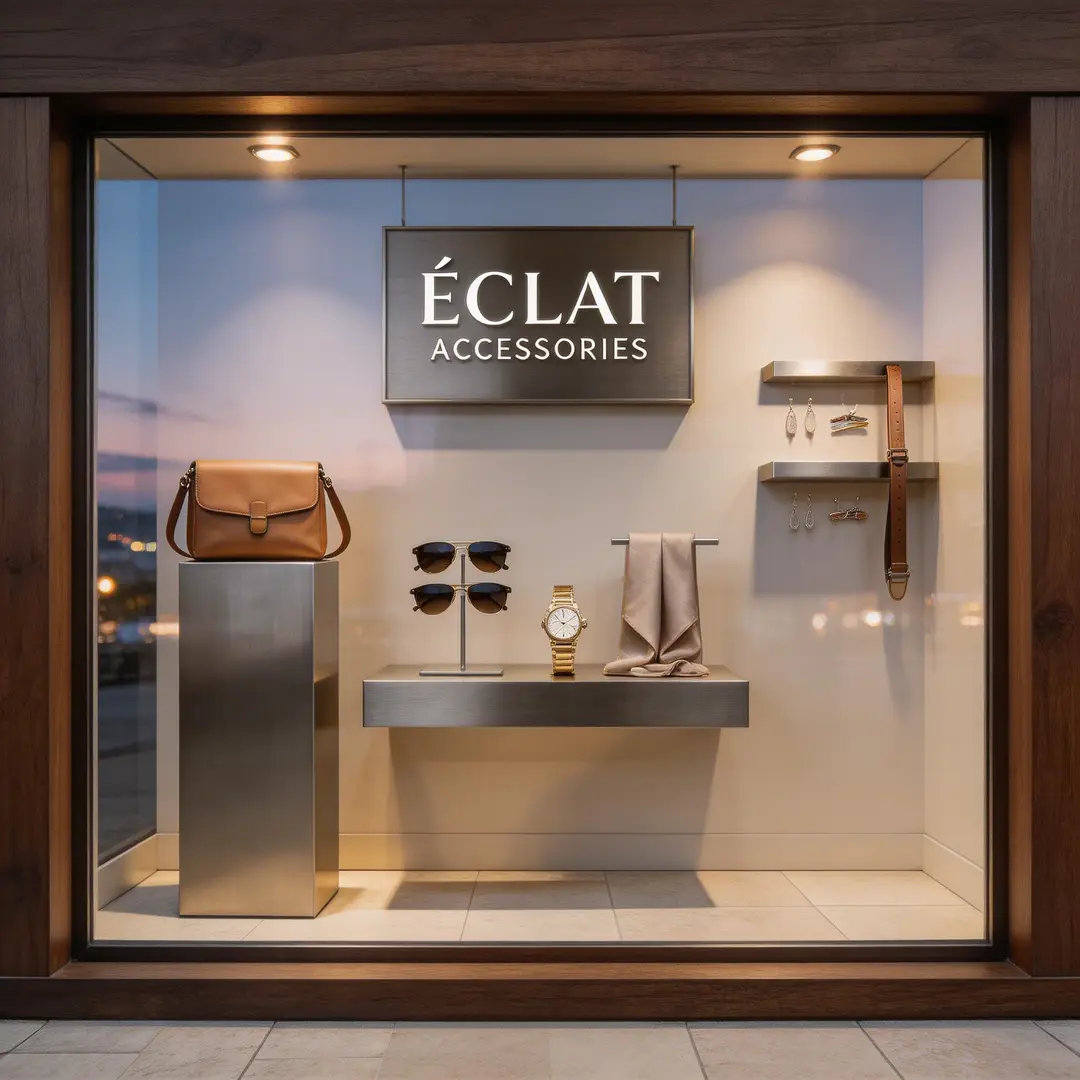
Best for branded retail and environment concepts ready for review.

A retail window concept frame with polished materials, clean display composition, and a brand-ready atmosphere.

Retail window concept frame

Proven industry-standard Prompt best-practice generation workflow guide

[store or environment] + [display elements] + [materials] + [light] + [brand mood]

Dive into Complete prompt Documentation and Technical SpecificationsShow Full Breakdown

Detailed prompt Breakdown and Overview

Create a premium retail window concept for a modern accessories brand. Use dark walnut framing, brushed metal display elements, pale stone flooring, soft evening light, and a polished brand presentation mood. The scene should feel ready for an internal retail review deck.

Core Components That Power This Prompt’s High-quality Outputs

This prompt gives Seedream 5.0 a clear environment, material story, and review context to create a controlled commercial image.

Target Final Generated Outcome

A polished retail environment concept for brand and visual merchandising review.

Expert Insider Tips for Creative Industry Professionals

  • List the main display materials before adding atmosphere.
  • Describe the scene as a review asset if the output should feel presentation-ready.
When to choose Seedream 5.0

Choose Seedream 5.0 for broader multi-image support in the newer Seedream family

Seedream 5.0 is the better fit when you need updated Seedream behavior, more multi-image input options, and polished high-res output in one hosted workflow.

Choose Seedream 5.0 when multiple inputs shape a polished result

Use it for campaign boards, product families, brand systems, and tasks where both multiple references and polished review output matter.

Use another model when a different priority matters more

Pick Seedream 4.5 for maximum high-resolution polish, Seedream 4 for the mature earlier route, and another model if structured text-aware briefs are your top focus.

Community proof

Video walkthroughs and independent reviews for Seedream 5.0

These videos share creator perspectives on the newer Seedream family, useful for verifying its updated behavior, multi-image support, and comparisons to other hosted models.

Curated AI Video Generation Showcase

FAQs

FAQ

About AI Omni Video and our platform

What is Seedream 5.0?

Seedream 5.0 is the updated Seedream workflow, built for polished image generation and prompt editing when you want newer family behavior and broader multi-image support in a hosted tool.

What is Seedream 5.0 best for?

It excels at campaign boards, product hero images, stylized commercial scenes, brand reviews, and tasks where multiple references and high-resolution output are critical.

Does Seedream 5.0 support image input here?

Yes. It supports up to 14 reference images, making it practical for larger product boards, palette alignment, and multi-image creative direction work.

Which resolutions does Seedream 5.0 support here?

Seedream 5.0 supports common high-resolution aspect ratios here, with workflows centered on polished output using current exposed dimensions.

How do I write better prompts?

Describe your subject, reference roles, and desired finish. Prompts perform better when you explain how the image fits a review or campaign context, rather than letting the model infer the full visual hierarchy.

When should I use Seedream 5.0 instead of other models?

Choose Seedream 5.0 for broader multi-image support in one hosted workflow. Use Seedream 4.5 for maximum high-resolution polish, and another model if structured text-aware briefs are your top priority.

Is Seedream 5.0 good for multi-image product and campaign boards?

Yes. It’s a strong fit when multiple references, products, or styling cues need to inform a single polished campaign or review image.

Can I use Seedream 5.0 images commercially?

For production work, review Seedream 5.0 output like any hosted model output before publishing. Commercial suitability depends on your use case, review workflow, and platform terms.

Still have questions? We're here to help

Join Discord
Related models

Compare Seedream 5.0 with other image generators

If Seedream 5.0 isn’t the right fit, compare these model pages for different family versions, high-fidelity routes, or stronger text-aware editing.

Seedream 4.5 Image Generator

Use Seedream 4.5 when high-resolution polish is your main goal.

Explore Curated Associated AI Models

Seedream 4 Image Generator

Compare with Seedream 4 for the earlier mature Seedream workflow.

Explore Curated Associated AI Models

Nano Banana Pro Image Generator

Try Nano Banana Pro for another high-fidelity hosted route for structured creative briefs.

Explore Curated Associated AI Models

Flux 2 Pro Image Generator

Compare with Flux 2 Pro for a different polished visual bias in a hosted workflow.

Explore Curated Associated AI Models

Try Seedream 5.0 here

Open the generator, start with a clear campaign or review brief, and use Seedream 5.0 for modern high-res multi-image work.

Resources
  • Blog
  • Create
  • Scenes
  • Portfolio
  • Prompts
  • Image to Prompt
  • Batch Image to Prompt
Company & Legal
  • About
  • Contact
  • Privacy Policy
  • Terms of Service
  • Refund Policy
Image Models
  • Z-Image
  • GPT-4o
  • Flux 2
  • Flux 2 Pro
  • Flux 2 Klein
  • Qwen Image 2
  • Seedream 4.0
  • Seedream 4.5
  • Seedream 5.0
  • Grok Imagine
  • Gemini 3 Pro Image
  • Nano Banana Flash
  • Nano Banana 2
Video Models
  • Google Veo 3.1
  • Google Veo 3.1 Lite
  • Google Veo 3.1 Pro
  • Seedance 1.5 Pro
  • Seedance Fast
  • Seedance Quality
  • Seedance 2.0
  • Hailuo 02
  • Kling v2.6
  • Kling v2.5 Turbo
  • Kling v2.1
  • Kling v2.1 Master
  • Kling O1
  • Kling v3.0
  • Kling v3.0 Pro
LogoAI Omni Video

AI Omni Video | Fast, professional AI video creation

TwitterX (Twitter)DiscordEmail

AI Omni Video is an independent AI video generation platform. All third-party trademarks belong to their respective owners.

© 2026 AI Omni Video All Rights Reserved. DREAMEGA INFORMATION TECHNOLOGY LLC

[email protected]